Sales tax nexus for CPA firms
Know where every client has nexus. And why.
Upload a client's QuickBooks Online report exports or our template. Nexus Auditor tests every state's economic nexus rules, and physical nexus in the client's home state, under effective-dated law, and shows the numbers, the rule and its source behind each finding.
Decision support for your review, not a filed return.
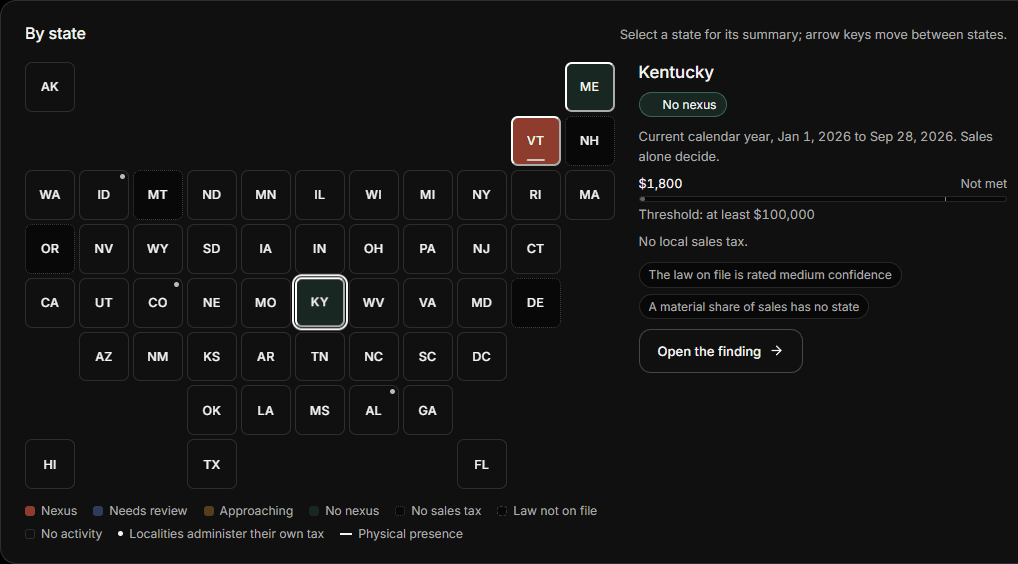
Nexus is a moving target.
Your clients sell into many states, and the rules keep shifting under them.
45 states plus DC, each with its own test
Dollar thresholds, transaction counts, AND versus OR, "more than" versus "at least", calendar year versus rolling 12 months.
The rules keep changing, sometimes mid-year
Illinois dropped its 200-transaction test on January 1, 2026, and Kentucky dropped its own partway through the year, on August 1, 2026.
Presence needs no sales threshold
An office, inventory or even one remote employee in a state can create physical nexus there, apart from narrow exceptions such as trade show safe harbors.
Exempt sales need proof
Where a state counts only taxable or retail sales, a sale booked as exempt or for resale counts toward the threshold unless a valid certificate supports it.
Marketplace sales count in some states
Some states count a seller's marketplace sales toward its own threshold, others exclude them, and a few have not said.
The address decides the state
QuickBooks Online reports can show a customer's default address, or a blank, instead of the ship-to typed on the invoice, so sales can land in the wrong state.
How it works
From QuickBooks exports to a state-by-state answer.
No QuickBooks connection to approve: export three standard reports, or fill in one template.
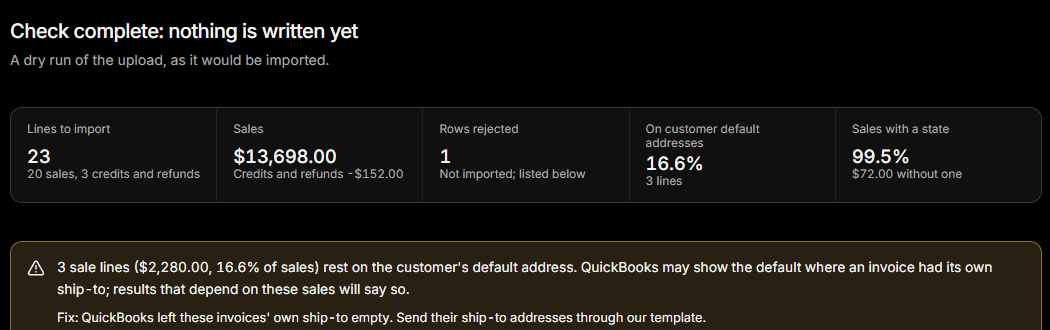
Check before any sales are recorded.
A dry run shows how many lines were read, which rows were rejected and why, how the sales tie to the report totals, and how much rests on a customer's default address.
No sales lines are recorded until you confirm, and an owner or admin can undo a confirmed import.
Export and upload
Sales by Product/Service Detail, Transaction List by Customer with addresses, and the customer list. CSV or Excel, up to 25 MB.
Check
Review rejected rows, unplaced addresses and default-address sales before any sales are recorded.
Confirm and analyze
Every state is tested. Uploads, undos and address fixes re-run the analysis on their own, and tell you if you need to run it again.
Review each finding
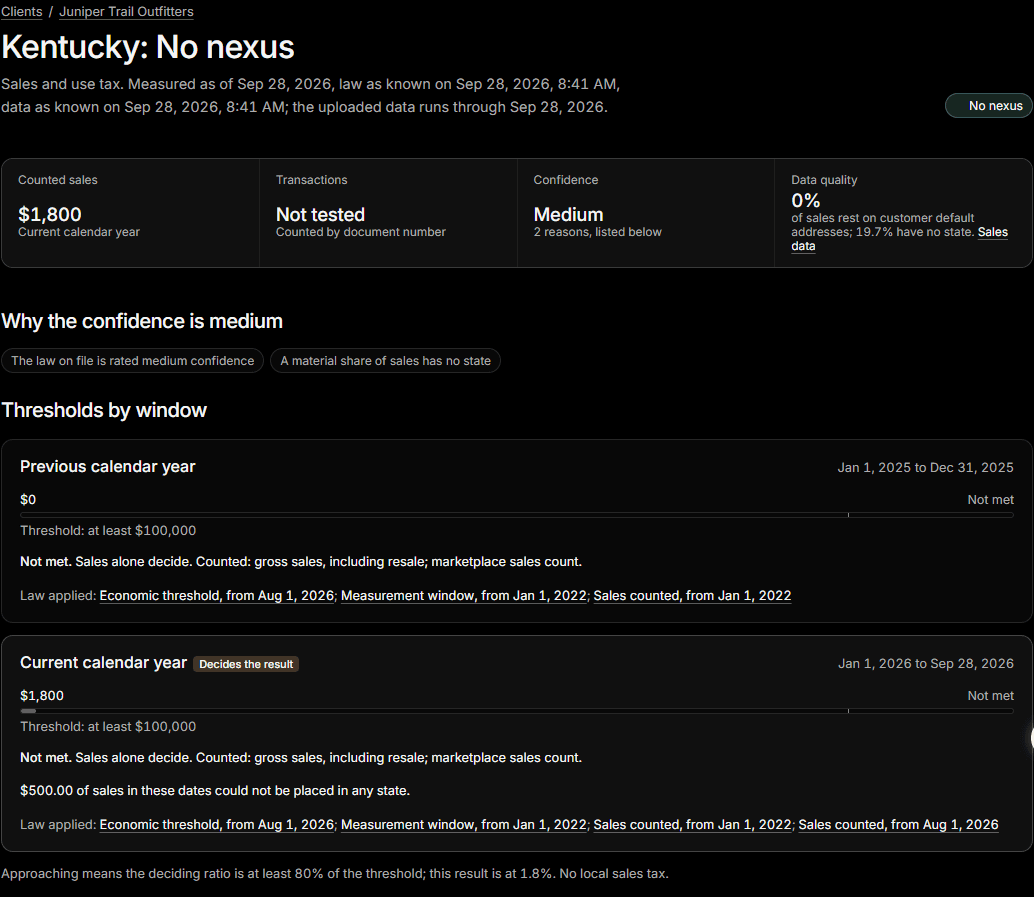
Open a state to see each test against its threshold, every measurement window, the law applied and the reasons behind the confidence.
Every finding
The math, the rule and the source.
Each state's result shows how it was reached, so a reviewer can follow it and the client file can support it.
- Each test against its thresholdSales, and transactions where the state still counts them, over each of its windows with the rule's comparator: more than, or at least.
- The law appliedEach rule version applied, with its effective date, source link and the date it was last confirmed.
- What countedThe state's sales basis, its marketplace and resale treatment, and the exempt or resale claims that counted.
- Why the confidence is what it isUnplaced sales, default addresses, data that does not cover the window, or law rated below high confidence each lower it, and the finding says which.
Built for how firms review work.
Results you can trace back to the data and the law, months later.
Traceable results
Every run records the law as known and the data as known at that moment, so a result can be traced back to both.
Effective-dated law
Rule changes are added as new versions with effective dates, never edited in place. Sales are counted under the rules in force on their dates, and a threshold met only under a repealed version is sent for review.
Sourced and dated
Each state's economic nexus rule shows its source and the date it was last checked; all were rechecked in September 2026. Rules where sources disagree or are silent carry a lower confidence rating.
One workspace per firm
All of a firm's clients in one place. Firms are isolated from each other in the database, and only owners and admins can undo imports.
Nothing is lost
Imports can be undone and address fixes are recorded, without deleting the history behind earlier results.
Clear about its limits
Decision support for your professional judgment, not a filed return or a legal opinion. Self-administered local taxes are marked but not evaluated, and income taxes are not covered.
Coming during early access.
Planned next, with local tax evaluation later. Early access firms help set the order.
Physical presence entry
Record employees, inventory and offices by state and date, so physical nexus is tested beyond the home state.
Exemption certificate tracking
Upload certificates and see which states they cover and when each one expires. Until then, every exempt or resale claim counts.
Preparer and reviewer sign-off
A review queue, with sign-offs that carry forward while a conclusion stays the same.
Alerts when a rule changes
Know which clients a new threshold or window affects before the next filing period.
Client-ready PDF memo
The findings, the law applied and the sources, formatted for the client file.
Local taxes evaluated, later
Self-collecting Colorado home-rule cities and other self-administered local taxes tested against their own rules.
Early access
Join early access
We are opening Nexus Auditor to a small group of CPA firms first. Leave your work email and we will reach out.
Questions firms ask first.
Do you connect to QuickBooks?
No. There is nothing to authorize in your client's QuickBooks. You export three standard QuickBooks Online reports (Sales by Product/Service Detail, Transaction List by Customer with shipping and billing addresses, and the customer contact list) or fill in our one-file template, and upload them.
Why does the address matter so much?
A sale generally belongs to the state where the customer receives it, usually the ship-to address; the billing address is only a fallback when no delivery address is known. QuickBooks Online reports can show a customer's default address, or a blank, instead of the ship-to typed on the invoice, so Nexus Auditor records where each sale's address came from and flags results where more than 10% of sales rest on default addresses. Addresses that cannot be placed in a state are listed so you can fix them.
Which taxes and places does it cover?
State sales and use tax: economic nexus for every state with a sales tax plus DC, physical nexus in the client's home state (recording other offices, employees and inventory is coming), and the Alaska Remote Seller Sales Tax Commission threshold for the local taxes of its member cities and boroughs. New Mexico's gross receipts tax and Hawaii's general excise tax are treated as those states' sales taxes. States where localities administer their own sales tax, such as Colorado's self-collecting home-rule cities, are marked but not evaluated. Five separate business taxes (Washington B&O, Ohio CAT, Texas franchise, Delaware and Oregon gross receipts) are listed as not evaluated, and income taxes are not covered.
How current is the law?
Each state's economic nexus rule shows its source and the date it was last checked; all were rechecked in September 2026. Changes are added as new versions with effective dates: sales are counted under the rules in force on their dates, the threshold in force on the measurement date decides, and a threshold met only under an earlier version is marked for review. Rules where sources disagree or are silent carry a lower confidence rating, which lowers the finding's confidence.
What does a finding show?
The status for the state; each test the state applies (sales, and transactions where it still counts them) against its threshold with the rule's comparator; every measurement window; what counted, including the state's sales basis, marketplace and resale treatment, and exempt or resale claims without a valid certificate; the rule versions applied with their sources; and the reasons behind the confidence level.
Is this a filed return or a legal opinion?
No. Nexus Auditor is decision support for your professional judgment. It does not register, file or remit anything, and its results are not legal advice.
Who can see a client's data?
Each firm has its own workspace, and firms are isolated from each other in the database. Everyone in a firm, including guests, can see its clients; roles decide who can change data, and only owners and admins can undo an import.
What files can we upload?
CSV, XLSX or XLS files up to 25 MB and 250,000 rows each. Files are stored when you upload them, but no sales are recorded until you review the check and confirm, and an owner or admin can undo a confirmed import.
What does it cost?
Early access is by invitation while we work with a small group of firms. Pricing will be published before general availability.
Bring one client's exports.
See every state for that client, with the rule and the source behind each result.
Join early access